Complete guide · Updated 1 October 2026
Nigeria's New Digital Postcode: The Complete Guide
Nigeria's new digital postcode is an 11-character code that NIPOST gives to each individual building, for example FC 02 A09 DB 09. It launched on 1 October 2026. Find yours free at postcode.gov.ng/find by using your location, pasting a Google Maps link or typing an address, then tapping your building on the map.
| Official name | National Digital Alphanumeric Postcode |
|---|---|
| Run by | Nigerian Postal Service (NIPOST) |
| Launched | 1 October 2026 |
| Length | 11 letters and numbers, in five groups |
| Belongs to | The building, not the person |
| Cost to find, save or share | Free |
| Where to find it | postcode.gov.ng/find or the NIPOST Postcode app |
| Building not listed | Request one in the app; NIPOST says you should get a response within 24 hours |
| Wrong details | Suggest an edit; NIPOST says it completes reviews within 48 hours |
| Proof of address certificate | ₦1,500 per request, in the app |
What is Nigeria's postal code or zip code?
Nigeria has no single postal code or zip code for the whole country. Every place has its own code, and since 1 October 2026 two kinds exist side by side:
- The old six-digit postcodes cover postal districts, for example 100001 (Ikeja, Lagos), 900001 (Garki, Abuja) and 500001 (Port Harcourt). The first digit is one of nine postal regions, the first three digits together are the dispatch district, and the last three are the delivery location.
- The new digital postcodes point to a single building, for example FC 02 A09 DB 09. This guide is about these.
"Zip code" is the American name for a postcode, so when a form asks for a zip code it wants one of these. It does not want 234, which is Nigeria's phone dialling code. If the field accepts letters, your building's new code is the precise answer; if it only takes numbers, it was built for the old six-digit format (NIPOST hasn't announced any change to those codes).
For the old six-digit code of a particular state, LGA or town, see our sister site zipcodes.ng, which lists the legacy codes.
Old-code structure and examples: Postal codes in Nigeria (Wikipedia).
What is Nigeria's new digital postcode?
It is a code that points to one building. The old six-digit postcodes (like 100001) cover a whole postal district with thousands of buildings. The new code narrows that down from the state to the exact building, using GIS mapping.
NIPOST's own comparison sums up the difference:
| Old postcode | New digital postcode |
|---|---|
| 6 digits | 11 letters and numbers |
| Covers a wide postal district | Identifies one building |
| Built for sorting mail | Delivery, navigation and digital address checks |
| Needs street names and landmarks to be useful | A standard reference for the building on its own |
| Hard for apps and databases to use | Built to plug into business and government systems |
The postcode does not replace your address. NIPOST's formula is address + postcode: you keep writing "Plot 15, Example Street, Wuse 2, Abuja" and add the code underneath.
How do you read a Nigerian digital postcode?
Read it left to right, from the widest area to the single building. Each group of characters is one level.
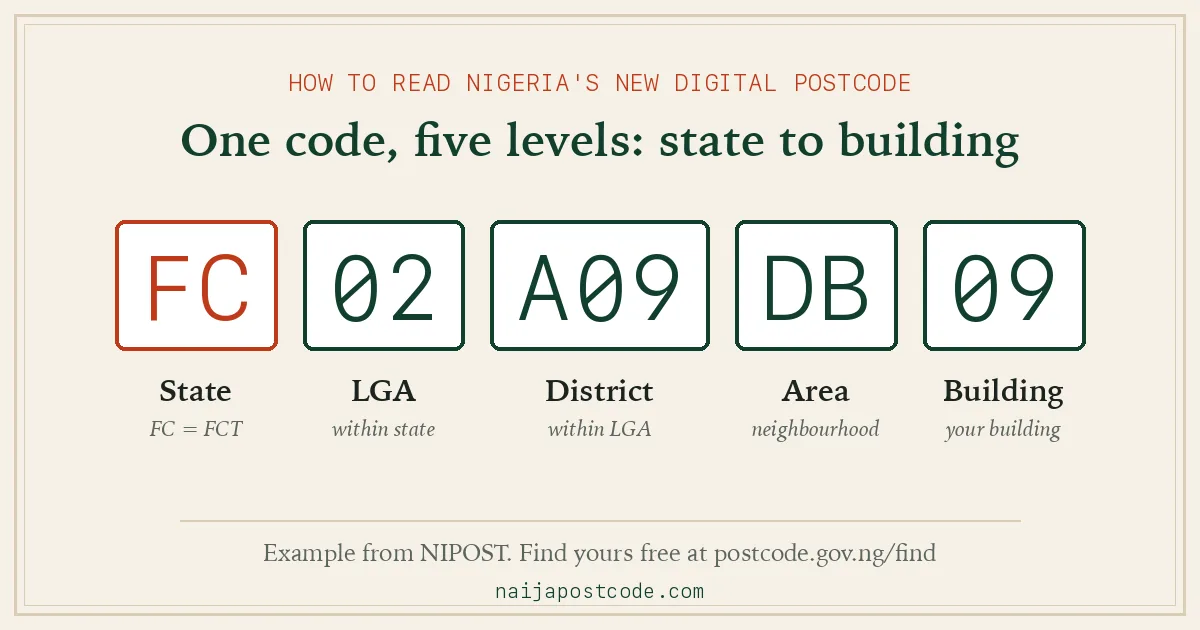
| Group | Example | What it identifies |
|---|---|---|
| State or territory | FC | The state, or the Federal Capital Territory |
| Local Government Area | 02 | The LGA within the state |
| District | A09 | The district within the LGA |
| Area | DB | A defined area or neighbourhood |
| Building unit | 09 | The individual building |
You don't have to memorise all 11 characters. NIPOST says the last four (the area and building, such as DB 09) are the part to remember, because the rest follows from where you are.
What are the state codes for the new postcode?
Every postcode starts with a two-letter code for one of Nigeria's 36 states or the FCT. NIPOST publishes the list only as an image; here it is as text you can search and copy.
| State | Code | State | Code |
|---|---|---|---|
| Abia | AB | Kano | KN |
| Adamawa | AD | Katsina | KT |
| Akwa Ibom | AK | Kebbi | KE |
| Anambra | AN | Kogi | KG |
| Bauchi | BA | Kwara | KW |
| Bayelsa | BY | Lagos | LA |
| Benue | BE | Nasarawa | NA |
| Borno | BR | Niger | NI |
| Cross River | CR | Ogun | OG |
| Delta | DE | Ondo | ON |
| Ebonyi | EB | Osun | OS |
| Edo | ED | Oyo | OY |
| Ekiti | EK | Plateau | PL |
| Enugu | EN | Rivers | RI |
| Federal Capital Territory (Abuja) | FC | Sokoto | SK |
| Gombe | GM | Taraba | TA |
| Imo | IM | Yobe | YB |
| Jigawa | JI | Zamfara | ZA |
| Kaduna | KD |
Codes that are easy to mix up: KD Kaduna, KN Kano, KT Katsina, KE Kebbi, KG Kogi and KW Kwara; NI is Niger State and NA is Nasarawa, not Nigeria; BE Benue, BR Borno and BY Bayelsa; OG Ogun, ON Ondo, OS Osun and OY Oyo. Abuja's code is FC, not "AB" (that's Abia).
How do I find my new postcode?
Use the official finder at postcode.gov.ng/find or the NIPOST Postcode app. No account or sign-in is needed to look one up. The website gives you three ways in:
Open the official finder1. Use my location (best when you're at the building)
- Go to postcode.gov.ng/find and choose Use my location. Allow location access.
- Wait for the GPS fix. The site asks you to hold still while it locks on.
- On the satellite map, find your building among the labelled buildings around you.
- Tap your building. The full postcode appears with Copy, Directions and Share buttons.
The finder does not automatically give you the nearest building's code. You choose the building yourself, so the map matters more than the GPS dot.
2. Use map link (best when you're somewhere else)
- In Google Maps, drop a pin on the building and copy the share link.
- On the finder, choose Use map link, paste it and tap Find postcode.
- If the pin isn't exactly on a building, the finder says it couldn't pin your exact building and shows the buildings around it. Tap the right one.
3. Use address (hit-and-miss for now)
- Choose Use address and type the house number or building name, then the street and area.
- Pick the matching result from the list and check it on the map.
In the app
The NIPOST Postcode app has the same tools: Find My Postcode uses your location, and the Search postcode or alias bar looks up an address, a postcode or a business name. As of 1 October 2026 the Android app is on Google Play (Postcode by Nipost) and the iPhone app is listed as "Soon".
How do I know I have the right postcode?
You have the right postcode when you selected the right building, not just the right street. Two buildings side by side have different codes, and your neighbour's code is valid but points to your neighbour's house. Before you use a code, check:
- The first two letters match your state. A Lagos building starts with LA, an Abuja building with FC. If they don't match, you're looking at the wrong place.
- The highlighted building is yours. Compare its position with the road, the gate and the buildings next to it on the satellite map.
- The address text describes your building. If the building is right but the description is wrong, fix it (below) rather than picking another building.
What if my building has no postcode?
Request one through the app. Don't use a nearby building's code and don't make one up. When a search finds nothing, the app says no postcode was found and that the location has no unit postcode, then offers Request Postcode. On the website, the map view shows a "Request a postcode for this spot" link.
- Address details. Your state and LGA load from your location. Then either fill in a standard address (house number, street, landmark) or describe the building (description, owner's name, landmark).
- Building details. Building type, ownership, arrangement and use, plus notes.
- Photos (optional). Gate, front, left, right and back views. Clear photos help the review.
- Review and submit. Check everything, then submit.
NIPOST officials review the request, and NIPOST says you should get a response within 24 hours. If approved, your building gets its own official postcode.
How do I correct wrong details on my postcode?
Open your postcode in the app, tap Edit and use the Suggest Edit screen. NIPOST says reviews are completed within 48 hours. You can change any or all of five details in one visit:
| Detail | Options |
|---|---|
| Address | Type the full correct address: house number, street, area and city |
| Structure type | Bungalow, Traditional hut, 1-Storey, 2-Storey, 3-Storey, More than 3 storey, Uncompleted/Unroofed, Dilapidated, Shed/Silo, Temporary container, Permanent container |
| Building use | Residential, commercial, institutional, mixed (for example shops below, flats above) or unknown |
| Ownership | Government, Private Ownership, or Private Agency/Group/Family |
| Photos | Add a clear picture of the building |
The Submit button turns yellow once you change something, and you'll see "Thank you. Your suggestion is being looked at." The old details stay visible until NIPOST approves the change. If you need the corrected address for a bank form or delivery, submit at least two days before your deadline. Count floors from the ground floor up, and only suggest what you know is true.
How do I save and share a postcode?
- Share: tap the Share icon under the postcode and pick WhatsApp, Messages or another app. You don't have to save it first.
- Copy: tap Copy to paste the code into a form or message yourself.
- Save: save places you use often and label them (Home, Office, Mum's House). Saved postcodes are under Saved → Bookmark.
- Primary postcode: mark one saved place as your primary postcode, the default for Postcode services. Changing it doesn't change any building's code.
A postcode tells someone where the building is. Access instructions like "use Gate B" still go in your message.
What is a postcode alias?
An alias is a name, such as your business name, that people can search to find your building's postcode. It doesn't create a second postcode or change the official one. When a business moves, the old building keeps its postcode and the business uses its new building's code; the alias is what lets customers keep finding it by name.
| Business (commercial) alias | General alias | |
|---|---|---|
| For | Registered businesses | Schools, places of worship and other known community places |
| Where to apply | The Postcode dashboard (web) | The app: Saved → Alias → General |
| Documents | CAC registration documents, ID of the person applying, proof of ownership or lease, a photo of the building | An identity document; phone, email, website and photo are optional |
| Review | Up to 48 hours | Up to 48 hours |
Business aliases are unique, which is why NIPOST checks CAC papers. NIPOST says the rules for businesses with several branches are still being finalised.
How do I get a proof of address certificate?
The app can issue an official certificate that links your identity to your building's postcode, for banks, visa applications, loans, school admission, job onboarding and other services that accept it. It costs ₦1,500 per request.
- Create an account in the app and have your postcode saved. If you haven't saved it, do the request while you're at home, because the app confirms the postcode from your location.
- Go to Extras → Proof of Address → Start a New Request.
- Enter one ID: NIN, international passport, driver's licence or Permanent Voter's Card (PVC).
- Select your postcode, pay ₦1,500, review and submit.
- NIPOST reviews it. You get an email when the certificate is ready, with instructions to download it. Keep your account email up to date.
A postcode on its own only proves where a building is; the certificate is what ties you to it. Whether a particular bank or embassy accepts the certificate is up to that organisation, so check with them first.
Can I get my postcode through my NIN or NINAuth?
Not yet. In July 2026, NIMC's Director-General, Abisoye Coker-Odusote, said NIMC and NIPOST had worked together "so that Nigerians will soon be able to confirm their address and retrieve their postcode through one trusted platform", meaning NIMC's NIN platform. As of 1 October 2026, NIPOST's own guides don't describe any NIN route, so use postcode.gov.ng or the Postcode app for now. Your NIN is already one of the accepted IDs for the proof of address certificate.
Source: Politics Nigeria, 11 July 2026; Condia, 1 October 2026.
How do I write the new postcode on a form?
Write your normal address, then the postcode on its own line, in the groups NIPOST displays:
Plot 15, Example Street, Wuse 2, Abuja
FC 02 A09 DB 09
Some forms, especially foreign websites, were built for numbers-only postcodes and may reject letters or spaces. NIPOST hasn't published guidance for those forms or said what happens to the old six-digit codes, so if a form won't take the new code, check with the organisation rather than inventing a number.
How can banks, shops and developers use the postcode?
Organisations can check and store postcodes through NIPOST's API, web and mobile SDKs or bulk access, after creating an organisation account at postcode.gov.ng/integration. NIPOST describes the flow as Capture → Validate → Resolve → Confirm → Store → Reuse: take the code at checkout or onboarding, check it, turn it into a location, show it to the customer to confirm, then save it with the order or record.
- Banks and fintechs can check that a customer or merchant address points to a real building. NIPOST is clear that a postcode alone doesn't prove someone lives or trades there. In its words, NIN answers who the person is; the postcode answers where the location is.
- Online shops and logistics can store a fixed destination with each order and group deliveries by area, district or LGA.
- Government agencies can use it for registration, tax notices, emergency response and planning.
Take exact field names, endpoints and caching rules from NIPOST's current API documentation; NIPOST warns they can change. Never let users fall back to a neighbouring building's code.
What do people get wrong about the new postcode?
- "It's my personal number." No. It belongs to the building. Everyone in a house shares it, and when you move you use your new building's code.
- "It replaces my address." No. Use address + postcode.
- "Google Maps already does this." A map pin helps you get there; the postcode is a standard reference that banks, shops and government records can all store for the same place. They work together.
- "I have to memorise 11 characters." Remember the last four, or save it in the app.
- "It's only for deliveries." Deliveries are the obvious use, but banks, insurers, utilities and government services use it too.
- "Only cities will get it." NIPOST designed it for rural communities too, including places without street names.
- "If my building isn't there, I'll use the nearest code." That code points to someone else's building. Request your own.
What hasn't NIPOST said yet?
As of 1 October 2026, these questions have no official answer:
- The old six-digit postcodes. No NIPOST page says whether they are withdrawn, kept for mail sorting or mapped to the new codes.
- 11 or 12 characters? NIPOST says 11, and its main example (FC 02 A09 DB 09) has 11. One of its own guides shows "FC 02 D11 AJ 003", which has 12. Treat 11 as the standard until NIPOST clarifies.
- The iPhone app. The App Store badge says "Soon", with no date. The Android app is already on Google Play.
- Full coverage. NIPOST says buildings are still being captured and validated. News reports put coverage above 90% at launch and full rollout across all states by December 2026; we haven't seen that in an official document.
- Multi-branch business aliases. Still being finalised.
We'll update this guide as NIPOST publishes answers.
Questions people ask
- What is Nigeria's zip code?
- There isn't one for the whole country. Old six-digit codes cover districts (100001 is Ikeja, Lagos; 900001 is Garki, Abuja), and since 1 October 2026 every building can also have its own digital postcode, such as FC 02 A09 DB 09. Use the code for your own address, never 234, which is the phone code.
- Can I find my postcode with my NIN?
- Not yet. NIMC said in July 2026 that postcode retrieval through the NIN platform is coming "soon". For now, use postcode.gov.ng/find.
- Is the new postcode free?
- Yes. Finding, saving and sharing a postcode is free on the website and app. Only the proof of address certificate costs money (₦1,500).
- What is Abuja's new postcode?
- Abuja has no single postcode. Every building has its own, and all of them start with FC (Federal Capital Territory). Find your building's code at postcode.gov.ng/find.
- What is the postcode for Lagos?
- Lagos postcodes start with LA, followed by the LGA, district, area and building, so each building's code is different. Look up your building on the official finder.
- Does my family share one postcode?
- Yes. Everyone in the same building uses the same postcode. It identifies the place, not the people.
- Do I need to sign in to find my postcode?
- No. The website finder works without an account. You need an account in the app for things like proof of address.
- How long does a postcode request take?
- NIPOST says you should get a response within 24 hours of requesting a postcode for your building, and corrections or alias reviews take up to 48 hours.
- Can I use my postcode as proof of address?
- Not by itself. The code proves where a building is. The ₦1,500 Proof of Address certificate in the app links you to it.
- Who do I contact about a problem?
- NIPOST's site lists [email protected] for questions, plus [email protected].
Sources
We read every guide on NIPOST's official postcode blog on 1 October 2026 and tested postcode.gov.ng/find the same day. NaijaPostcode is an independent site, not part of NIPOST.
- What is the New Alphanumeric Postcode? (format, state codes, comparison table)
- 9 Things People Get Wrong About the New Postcode
- How to Find Your New Digital Postcode and How to Make Sure You Have the Right Postcode
- What to Do If Your Building Does Not Have a Digital Postcode
- How to Correct Wrong Information on Your Postcode
- How to Share a Digital Postcode and How to Save and Organise Postcodes
- What Is a Postcode Alias? and How to Create a Postcode Alias
- How to Use Nigeria's Digital Postcode as Proof of Address
- How to Integrate Nigeria's Digital Postcode Into Your App, banks and fintechs, deliveries, government services
- postcode.gov.ng FAQ; launch coverage: Condia, 1 Oct 2026